
Sahawatthanakit (1988) Co., Ltd.
SAHAWATTHANAKIT(1988) · Make It Smart
Digital Tools for Industrial SMEs · 11

13-Week Cash Flow Forecast (Thai + English editions)

Fixed price · instant download after payment · no quote needed

A Thai SME owner at his desk reviewing a weekly cash flow plan, invoices and a calculator in front of him, a small factory office behind.
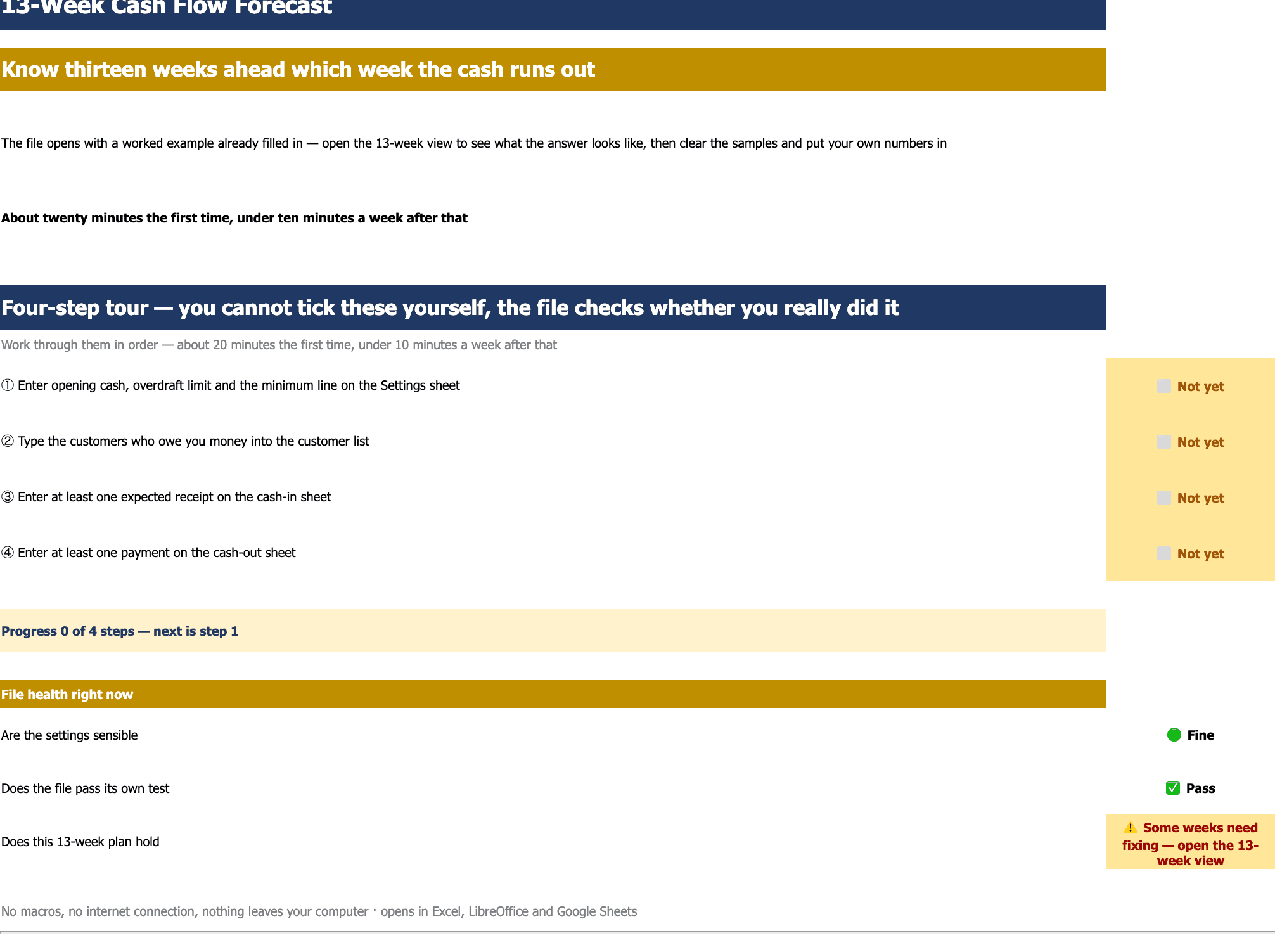
The first sheet: a four-step guided tour with all four status cells amber reading 'not yet', and a three-line file-health panel below — two green, one amber warning that some weeks need attention.
Sheet one, the guided tour — four steps that tick themselves when really done: enter opening cash, OD limit and minimum line → list the customers who owe you → add at least one expected receipt → add at least one payment due. About 20 minutes the first time, under 10 minutes a week after. The health panel below answers three questions continuously: are the settings sane, does the file's self-test pass, and does this 13-week plan pass?
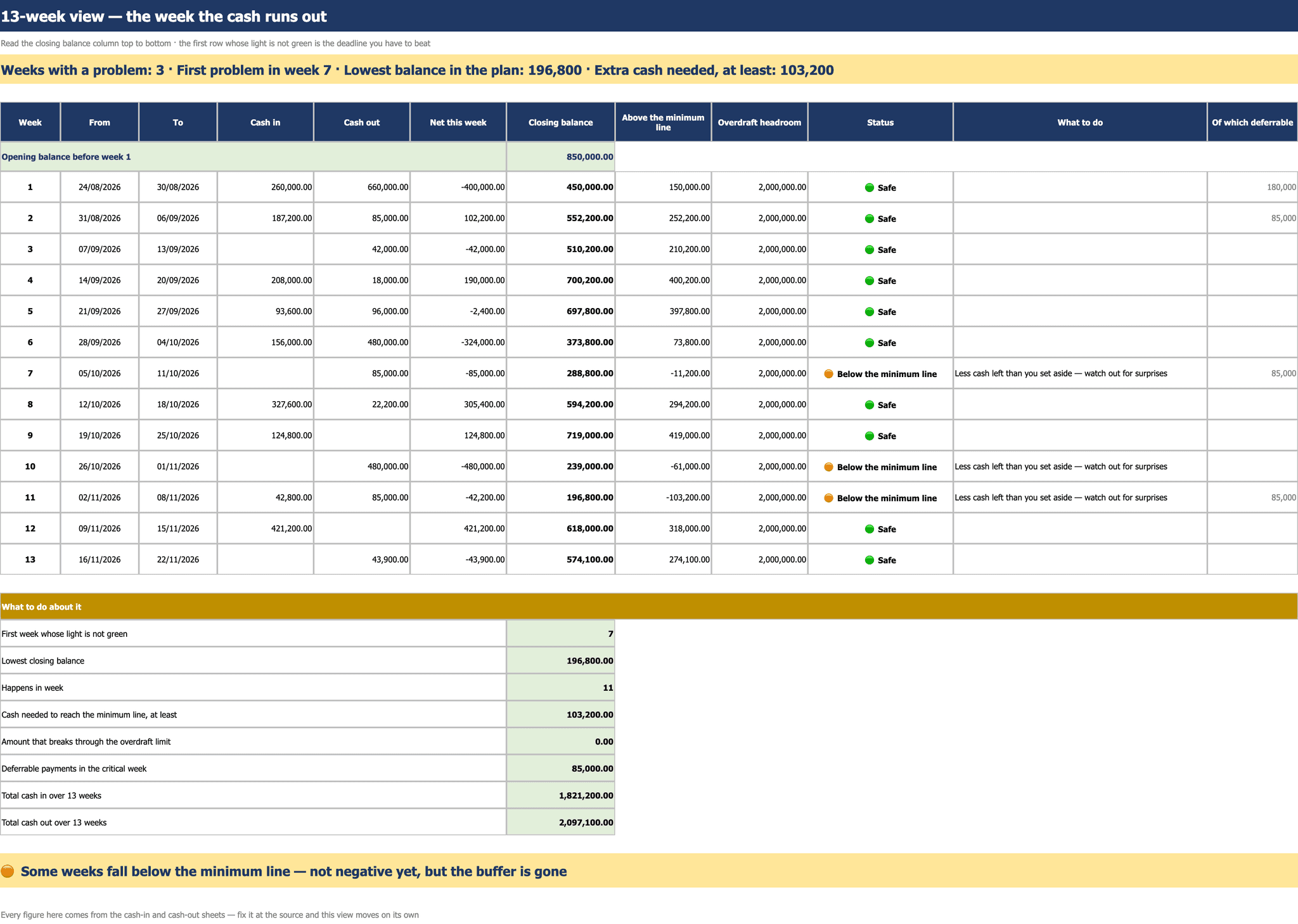
The 13-week view: thirteen rows of cash in, cash out, closing balance, distance from the minimum line, OD headroom and a status light, with three weeks amber for falling below the minimum line, and an action summary table below.
The 13-week view — the heart of the file. Read the closing-balance column top-down; the first row that is not green is the deadline you must fix before it arrives. The banner states it at once: how many weeks are in trouble, which one breaks first, the lowest balance across the plan, and the minimum you must raise. The table below adds how much would breach the OD limit, and how much is marked deferrable in that crisis week — the ammunition you actually hold before borrowing more.
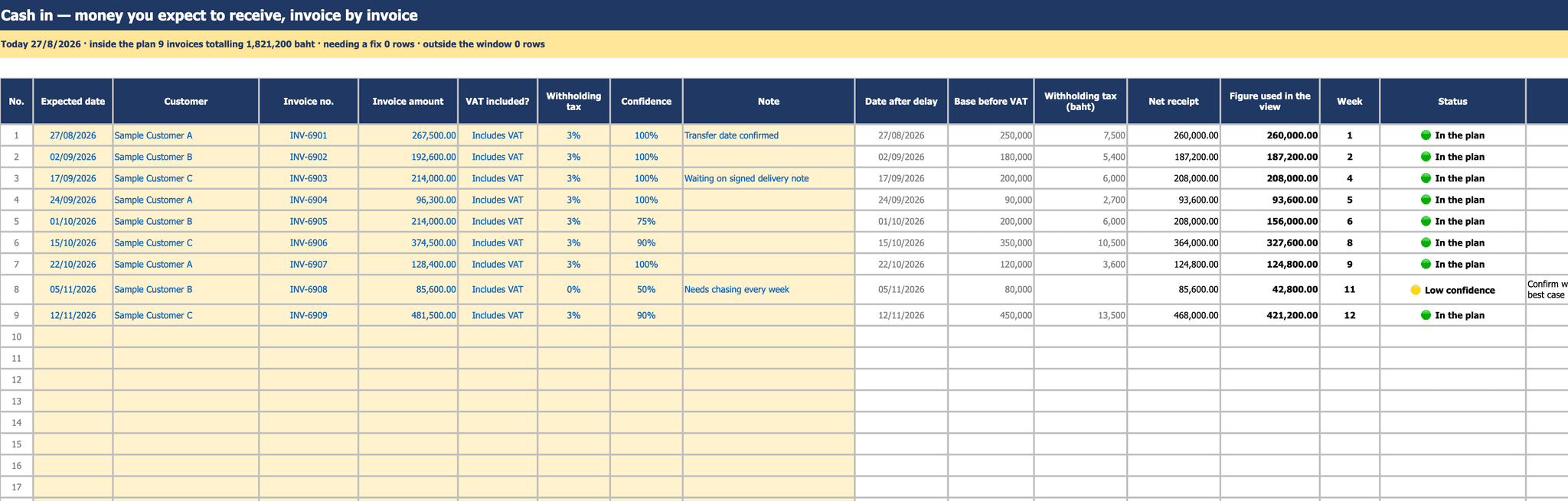
The cash-in sheet: nine invoice rows with expected date, customer, invoice amount, VAT flag, withholding rate and confidence, alongside computed columns for the pre-VAT base, net receipt, the amount used in the forecast, and the week number.
Cash in — fill the yellow cells per invoice: expected date, customer, invoice number, amount, whether VAT is included, the withholding rate, and your confidence as a percentage. The file derives the pre-VAT base itself and applies withholding to that base as the law requires (not to the gross), then multiplies by confidence to get the figure that actually reaches the forecast. Invoices below your threshold turn amber with a prompt to go back and confirm — row 8 in this shot.
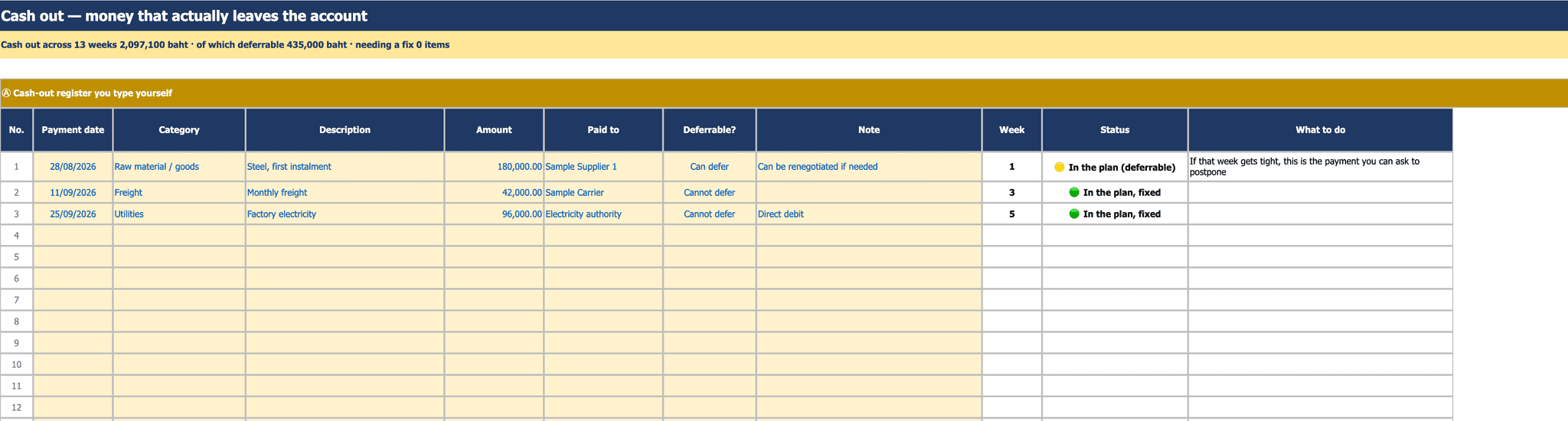
The cash-out sheet, manual register section: three sample rows with pay date, category, detail, amount, payee and a deferrable column, plus a status light and recommended action.
Cash out, part one — the register you type yourself. The column that matters most is 'deferrable': lines marked deferrable are counted as reserve ammunition for a crisis week, and the light says so outright — 'if that week is tight, this is the one you can ask to postpone'. The banner totals 13 weeks of outflow and how much of it is deferrable.
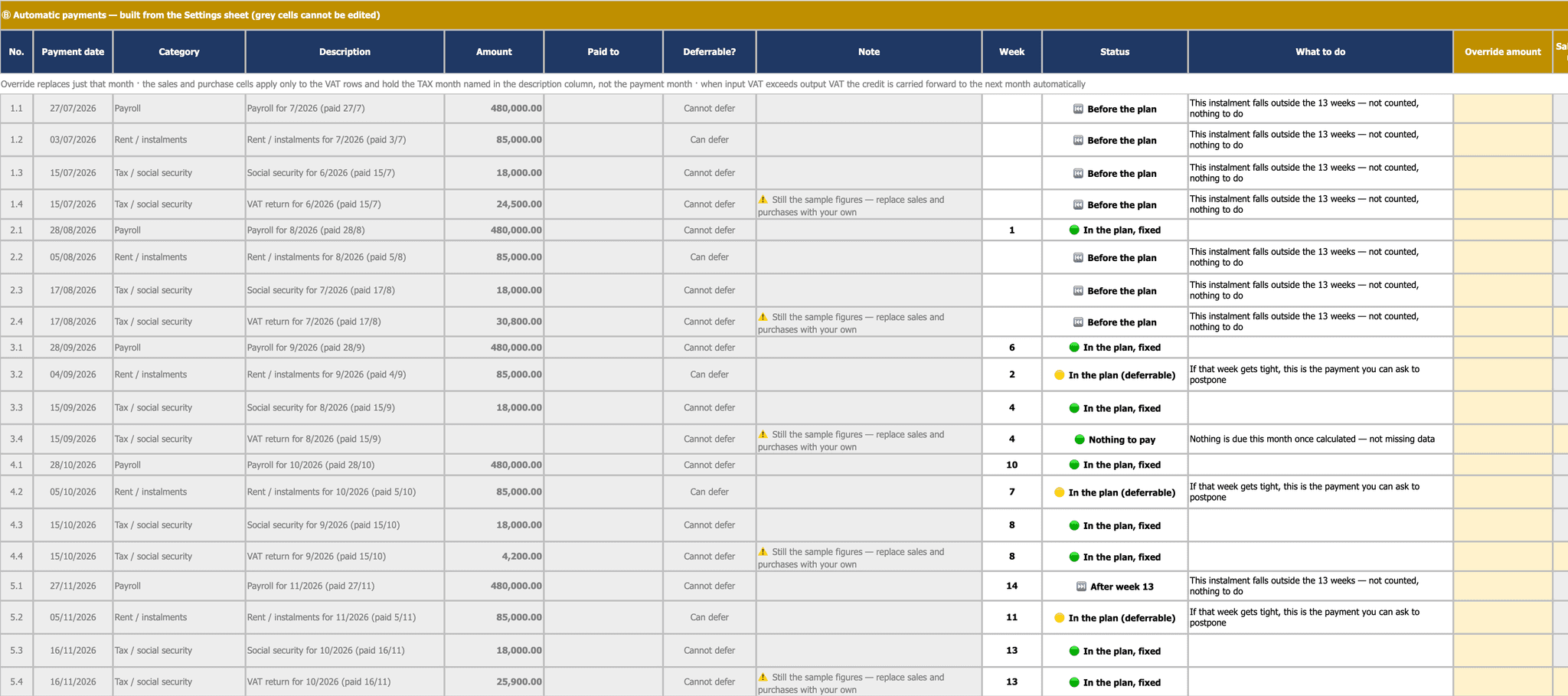
The auto-generated payments section: payroll, rent, social security and the VAT return created across five months, each row carrying a week number, a status light, and a marker for before the plan window or after week 13.
Cash out, part two — monthly payments the file generates from your settings, four kinds across five months. The part that is hard to do by hand: “payroll and rent landing on a holiday move EARLIER, while social security and the VAT return move LATER” — opposite directions, matching reality. Input VAT above output VAT carries forward against the next month under section 82/3. Instalments before or after the 13-week window are labelled as excluded from the view rather than silently missing, and any amount can be overridden for that month alone.
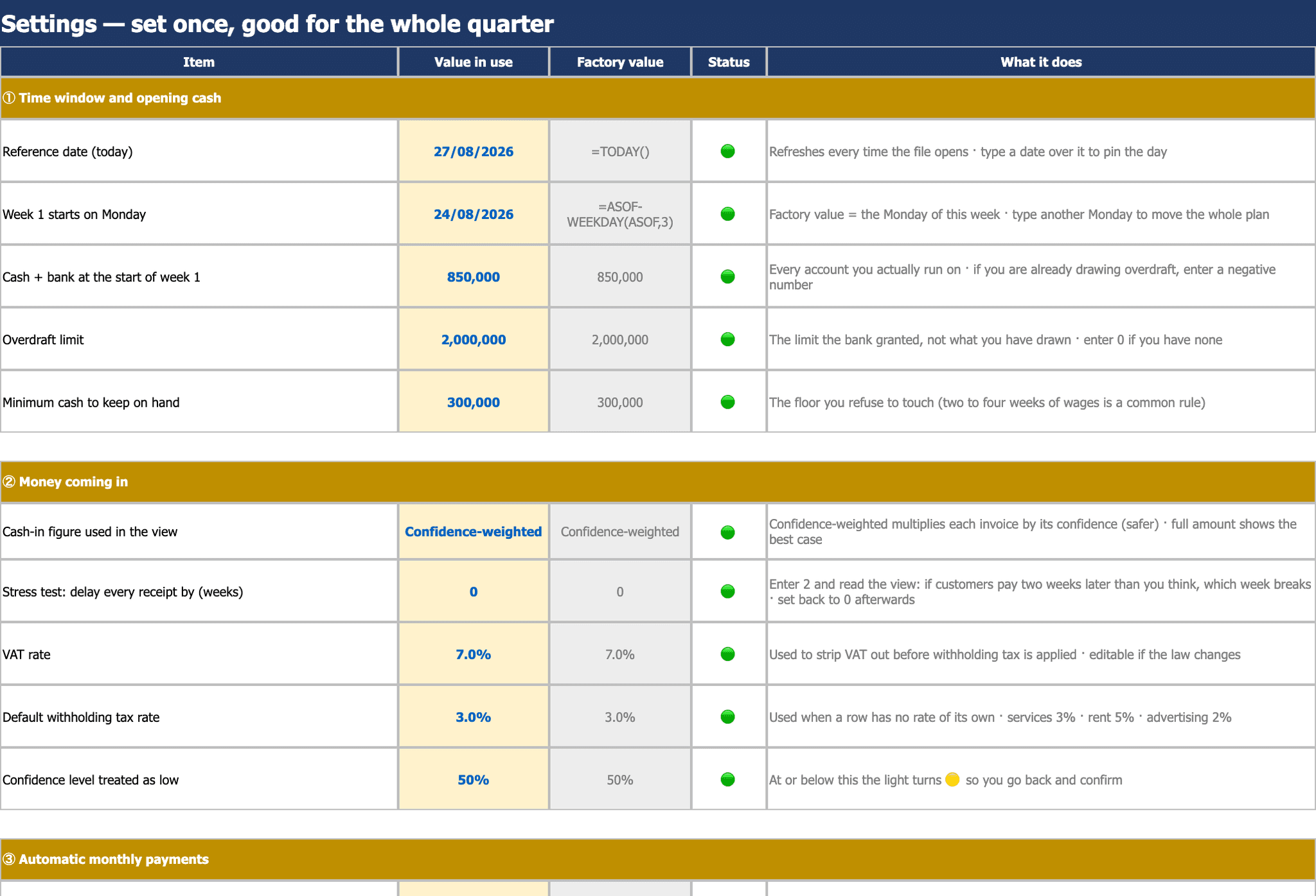
The settings sheet with columns for the value in use, the factory value, a status light and an explanation, covering the period and opening cash, and the receipts section including the delay-all-receipts test switch.
Settings — set once, use all quarter. Every line carries its factory value beside it to copy back when a change goes wrong, and a light saying whether the value is sane. The line that makes people sit up is “test: delay every receipt by N weeks” — set it to 2, open the view, and see exactly which week you die if customers pay a fortnight late; set it back to 0 when done. The receipts mode toggles between confidence-weighted (safer) and full value (best case).
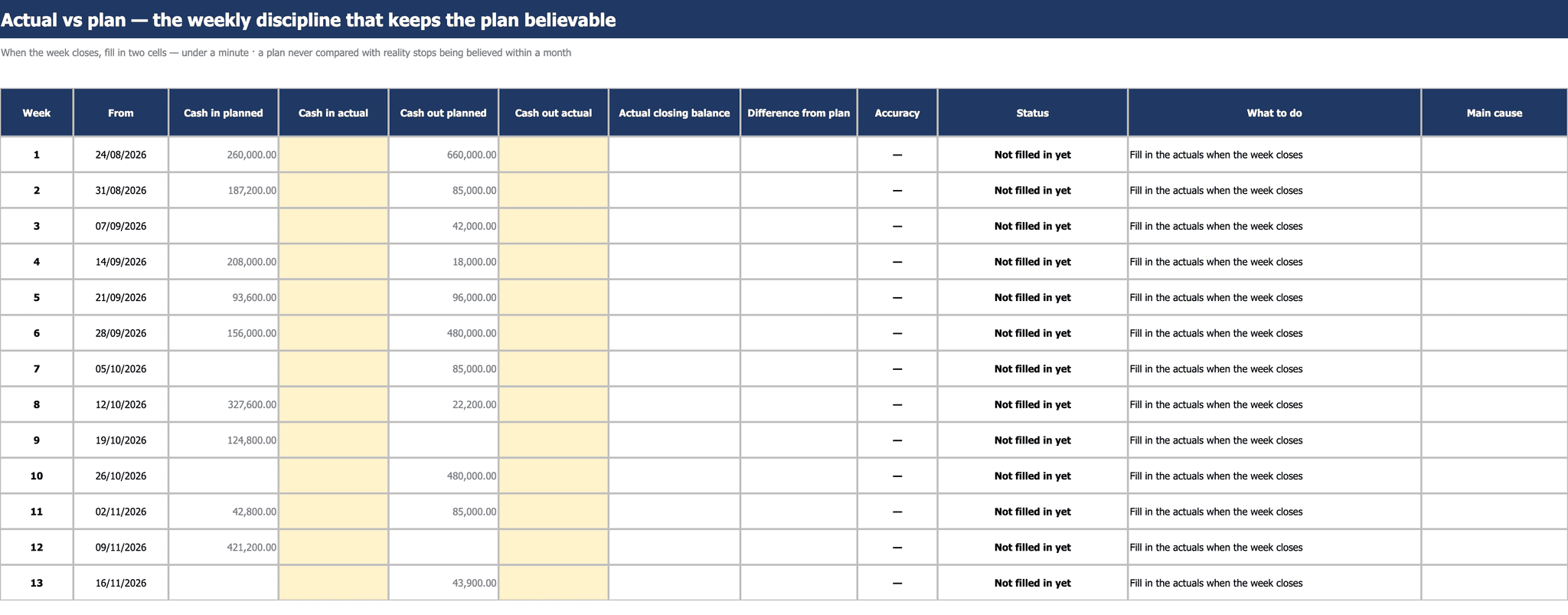
The actual-vs-plan sheet: thirteen weeks with expected and actual cash in and out, the actual cells highlighted yellow awaiting entry, and the accuracy column still blank.
Actual vs plan — the weekly discipline that keeps the forecast believable. At each week's close you enter two real numbers, cash in and cash out; it takes under a minute. The file computes the actual closing balance, the variance against plan and an accuracy score, with a field for the main reason. Why this sheet exists: a forecast never checked against reality stops being believed inside a month.
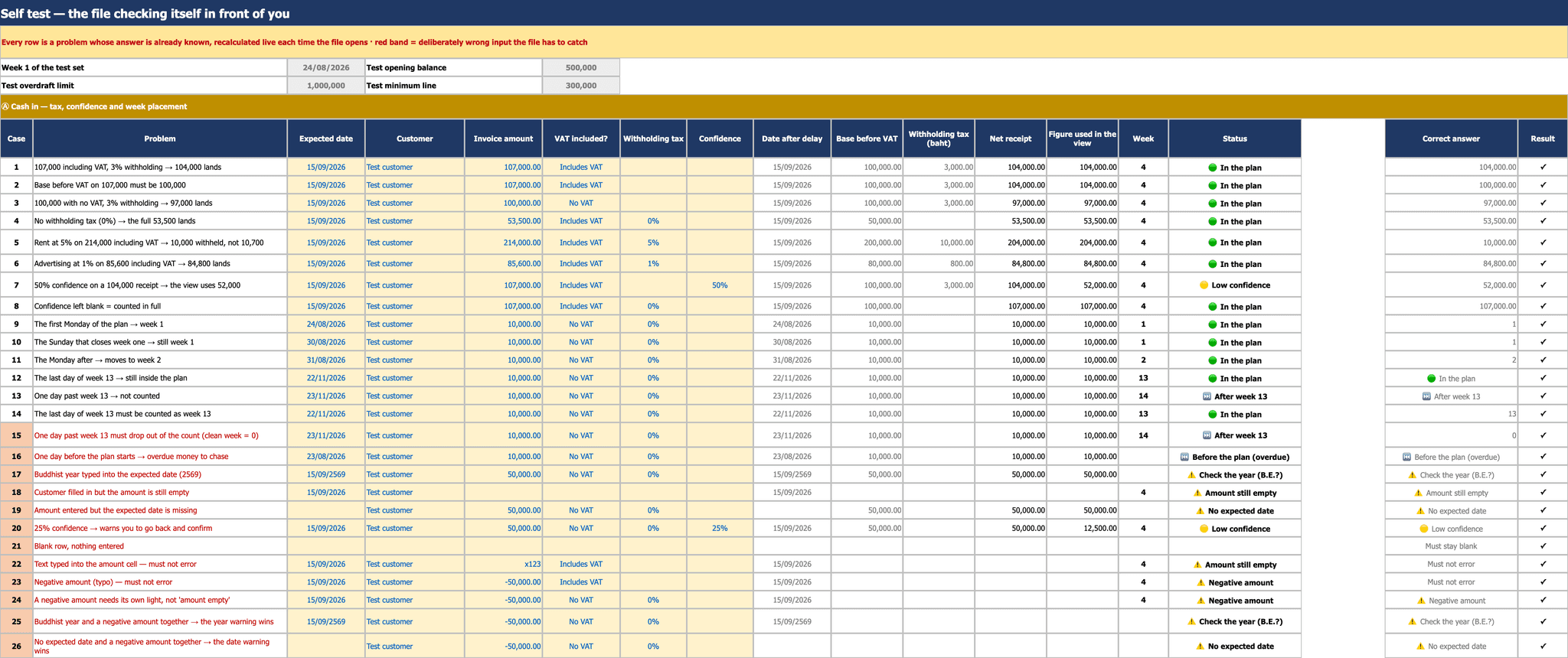
The self-test sheet listing test cases with the scenario, the computed value, the expected answer, and a result column showing a tick on every row, covering both normal and deliberately broken inputs.
The self-test — 48 cases recomputed live every time the file opens, using the same formulas as the real sheets. It covers tax and week-bucketing (withholding on the pre-VAT base at 3%/5%/1%, VAT-free invoices, confidence weighting), the week-1 and week-13 boundaries, and “deliberately broken inputs” — negatives, text in number cells, Buddhist years, a missing expected date — which must raise a readable warning and must never error. The red rows are the deliberately wrong ones the file has to catch.

Screenshots of the file you actually receive — the figures shown are sample defaults, and every cell is yours to change.

One purchase, two files. You receive both the English (Thailand) edition shown in the screenshots above and the Thai edition — generated from the same formulas, so the two can never disagree about a number.

An Excel 13-week cash flow forecast for businesses that are profitable on paper but short of cash on payday — the standard turnaround-consultant tool, not an accounting report. It answers the one question financial statements cannot: which week do we run out, and how much do we need to find? The 13-week view shows each week's closing balance with its distance from your minimum cash line and the OD headroom left, while the banner states immediately how many weeks are in trouble, which week breaks first, the lowest balance across the plan, and the minimum you must raise. Four status tiers — safe → below the minimum line → negative, drawing on OD → past the OD limit — and each one names the action, not just a colour. Cash-in is entered per invoice: expected date, customer, invoice number, amount, whether VAT is included, the withholding rate, and a confidence percentage. The file derives the pre-VAT base itself, applies withholding to that base as the law requires, and weights what reaches the forecast by confidence (switchable to full value). Invoices below your confidence threshold raise a flag to go back and confirm with the customer. Cash-out has two halves: a register you type yourself, where each line can be marked deferrable — your ammunition in a crisis week — and monthly items the file generates from settings, four kinds across five months (payroll, rent/instalments, social security, and the VAT return). Payroll and rent falling on a holiday move EARLIER while social security and the VAT return move LATER, matching how these actually behave, and input VAT exceeding output VAT carries forward against the following month under section 82/3. A test switch delays every receipt by N weeks: set it to 2 and the screen shows exactly which week you die if customers pay a fortnight late. The 'actual vs plan' sheet takes two real numbers at each week's close and scores the plan's accuracy — a forecast never checked against reality convinces nobody within a month. Every setting keeps a factory value to copy back. A 48-case live self-test runs the same formulas as the real sheets, including deliberately broken inputs (negatives, text in number cells, Buddhist years, missing dates) that must raise a warning and must never error. Sheet one is a four-step guided tour that ticks itself only when you have really done each step: about 20 minutes the first time, under 10 minutes a week after that. It opens pre-filled with a worked example so you can see the result before clearing it for your own numbers. One purchase, two files: the Thai edition and this English (Thailand) edition, from the same 1,979 formulas. No macros, no internet, nothing leaves your machine — Excel, LibreOffice and Google Sheets all open it.

Launch price · until 31 Dec 2026

฿1,290≈ US$39Regular price ฿1,990Complete · one-time payment

This price includes 7% Thai VAT (goods ฿1,205.61 + VAT ฿84.39) — nothing else is added. You are charged ฿1,290 THB; the US$ figure is an approximate guide at today's rate and your bank converts at its own. Cards from any country are accepted.

  • Two editions in one purchase — Thai and English files, identical formulas.
  • Download immediately after payment — no waiting.
  • The manual lives inside the file (first sheet) — usable without anyone training you.
  • Every default is yours to change, and a “factory value” column restores the original when you break something.
  • A plain .xlsx with no macros — opens in Excel, LibreOffice and Google Sheets.
  • A full Thai tax invoice can be issued — deductible as a company expense (registered company).
  • Buy in your company’s name — enter the company name and 13-digit tax ID at checkout and we issue the tax invoice to match.

We send the files to this address as soon as payment clears.

Pay by PromptPay or credit/debit card through Stripe (secure, industry-standard encryption).

What support covers

This is a finished file sold outright, once. It does not include installation, training or per-customer customisation — the common questions are answered in the manual inside the file.